


 299 / 430

6.27
Sales Service Centre • 01952 675612 Technical Support Helpline • 01952 675689
Time Switches
Technical Specifications
Electrical characteristics
• Supply : 30 V DC bus EIB
• TXA022 : consumption : max. 9,5 mA
• TXA023 : consumption : max. 10 mA
Working characteristics
• Programming capacity : 56 steps
to be distributed over the two channels
• Minimum time between 2 steps : 1 minute
• Start precision : 5 1.5 sec / 24h
• Start reserve : lithium battery cell (battery life 5 years)
• The product is placed in home position (display switched off) after
1 minute of voltage absence. It returns to Auto mode immediately
on return of the voltage or on pressing on a key.
• Protection index : IP 20
Environment
• Working temperature: -5 to +45 °C
• Storage temperature : -20 to +70 °C
Connection with Cage Terminals
• Flexible : 1 to 6mm
2
• Rigid : 1.5 to 10mm
2
Reset
• Of the programme: it can be fully reset by simultaneously pressing
the 3 bottom keys ( OK & menu). The time and date are maintained.
• Total : by simultaneously pressing on all 5 keys (+, -, menu, ok &
) All the product content is deleted. After a total reset, it is
necessary to reset the clock switch to hour and day.
Main Characteristics
• Product delivered set to current hour and day
• Automatic changing of summer / winter time
• Programming key
for permanent exemptions
for copying or safeguard of the programme
• Programming by day or group of days
• 56 step of program On, Off, 1 sec to 30 mn or dimming
• Permanent manual On or Off (fixed),
• Temporary manual On or Off that can be parametered by
configuration tools
• Temporary exemptions On or Off (flashing),
• Vacation mode: forcing On or Off between two dates
• Presence simulation
Bar chart displaying daily profile
• Possibility of locking the key
• Programmable off-voltage
• DCF sycnhronization (TXA023 ONLY)
• Possible display of date and hour on the bus
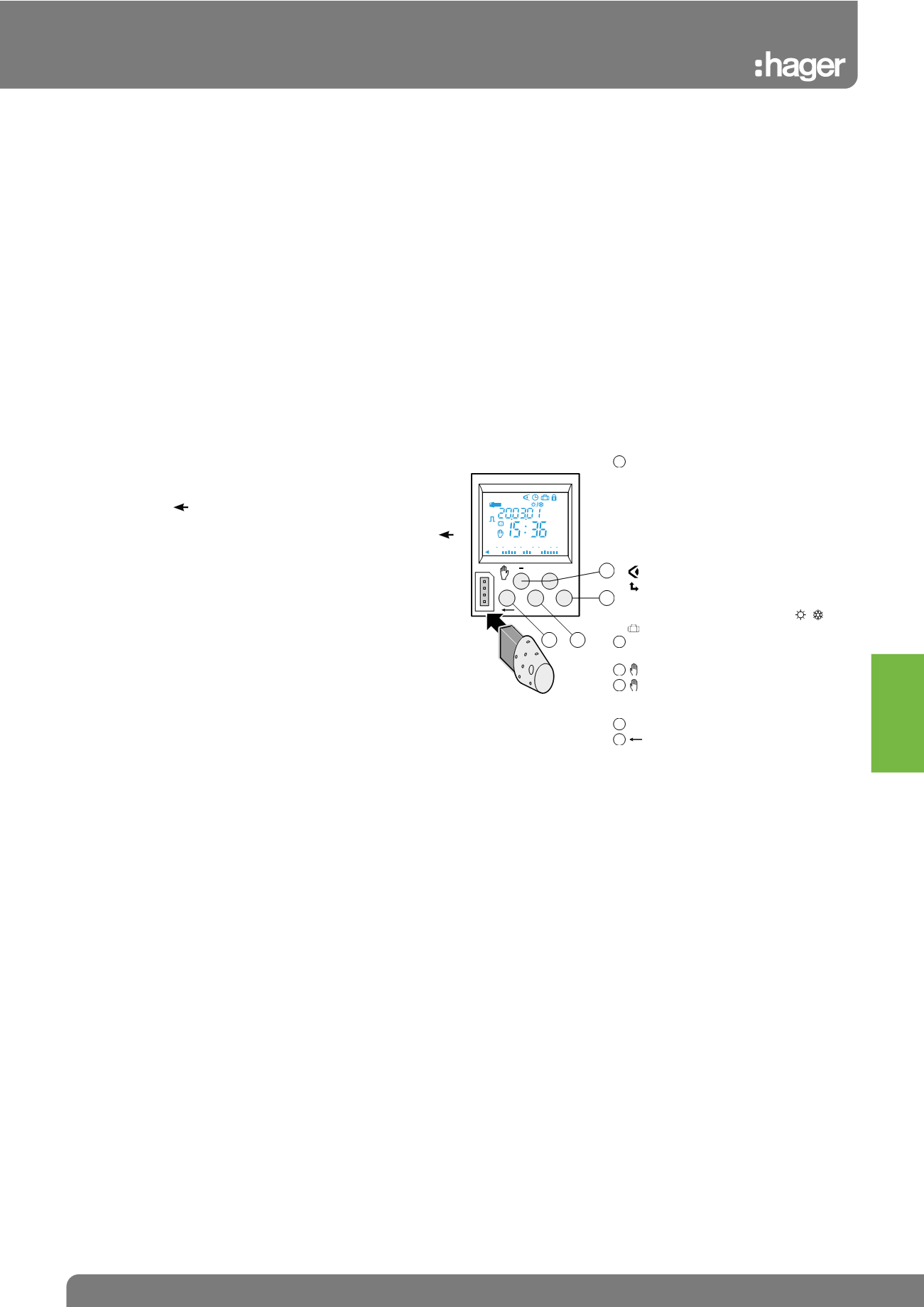
Product presentation
You can go to Auto mode at any time with the menu key. If no action
is done for 1 min, the switch returns to Auto mode.
ok menu
+
auto prog
modif
new
On
Off
24
18
12
6 0
1
2
3 4
menu : selection of the functioning
mode
auto : functioning as per the
programme established
prog : new for programming
prog : modification to modify or
delete a programme existing
step
: display of the programme
: modification of hour, date and
choice of the summer/winter
time changing mode
: adjustment of vacation
+ et - : navigation or adjustment of
values
: in Auto mode, selection of
vmanual, exemptions or
unpredictable functioning
OK
: validate the flashing info
: come back to the previous
step
1
2
A
B
3
4
/
Tebis KNX