


 295 / 430

6.23
Sales Service Centre • 01952 675612 Technical Support Helpline • 01952 675689
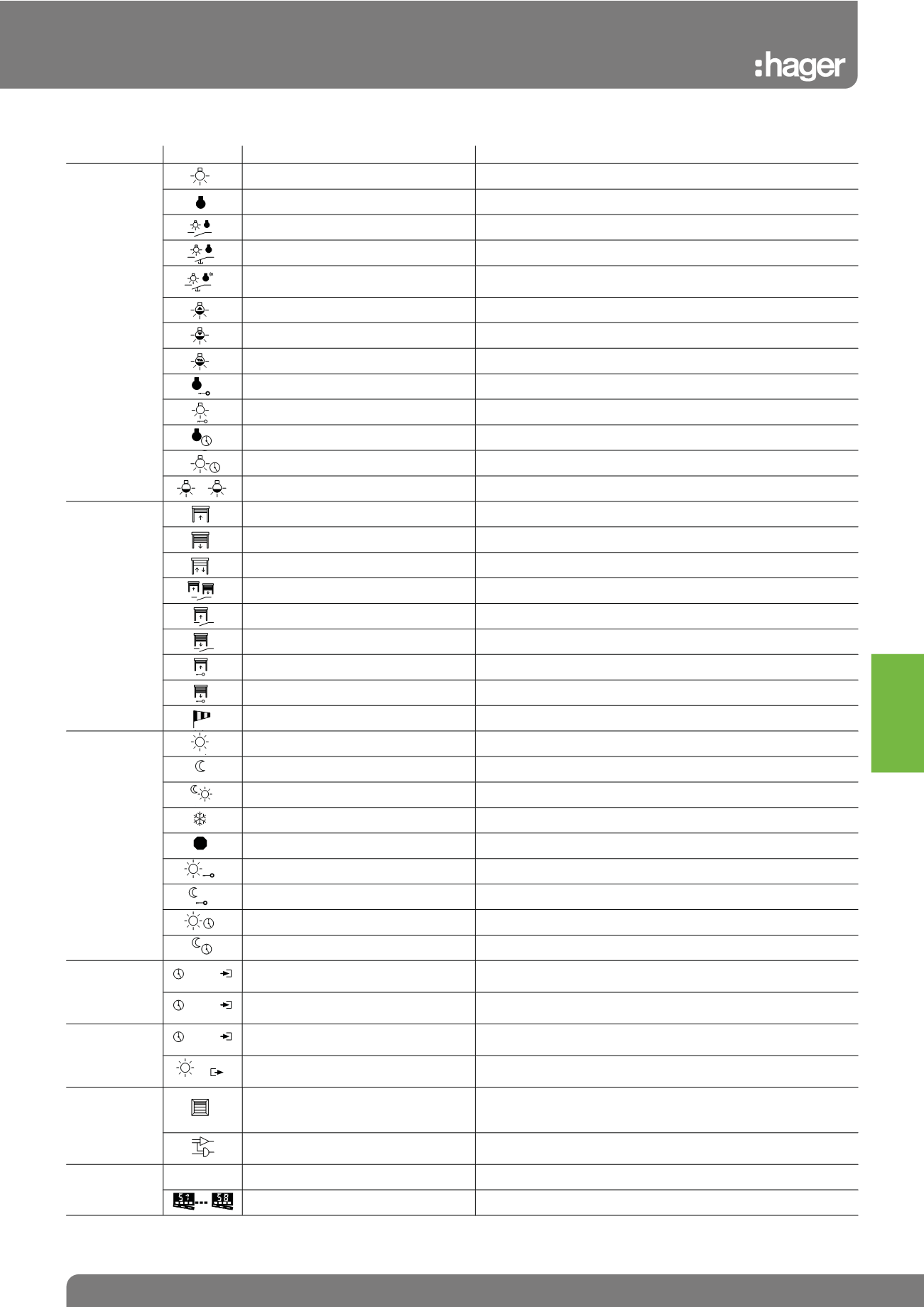
Control Types
Symbol and Function
Applications Symbols Control Type
Control Product
Lighting
Switching on only
Automatic contact or push button, or TXA023, TXA025
Switching off only
Automatic contact or push button, or TXA023, TXA025
Switch type ON/OFF
Automatic contact or push button, or TXA023, TXA025
Remote break type ON/OFF
Push button
Remote break type ON/OFF for
unidirectional products
RF Push button
Increase the dimming level
Push button
Decrease the dimming level
Push button
Dimming on push button
Push button or detector, TX511, TXA023
Priority setting STOP
Automatic switch or contact, or TX510, TXA023, TXA025
Priority setting START
Automatic switch or contact, or TX510, TXA023, TXA025
Timed start - delay before ON
Automatic switch or contact, or TX510, TXA023, TXA025
Timed stop - delay before OFF
Automatic switch or contact, or TX510, TXA023, TXA025
Lighting level 25%, 50%, 75% or 100% TX510, TXA023, TXA025
Blinds/
Roller Shutters
Push button type UP
Push button
Push button type DOWN
Push button
Push button type UP-DOWN
Push button
Switch type UP-DOWN function
Automatic switch or contact, or TX510, TXA023, TXA025
Swtich type UP function
Automatic switch or contact, or TX510, TXA023, TXA025
Switch type DOWN function
Automatic switch or contact, or TX510, TXA023, TXA025
Override UP
Automatic switch or contact, or TX510, TXA023, TXA025
Override DOWN
Automatic switch or contact, or TX510, TXA023, TXA025
Wind safety
TG050 air safety detector
Heating
Comfort
Temp. regulator, TX510 automatic push button or contact
Eco
Temp. regulator, TX510 automatic push button or contact
Comfort / Eco
Temp. regulator, TX510, TXA023 automatic contact
Frost free or without frost
Temp. regulator or automatic contact TX510, TXA023
Stop override
Automatic switch or contact or TXA023
Comfort override
Automatic switch or contact or TXA023, TX510
Eco override
Automatic switch or contact or TXA023, TX510
Timed comfort
Push button or detector TX510-TX511
Timed eco
Push button
TXA023
Clocks
Master clock
Diffusion TXA023 of the hour on the bus for synchronizing the slave
clocks
Slave clock
TXA023 synchronization on the hour emitted by the master
clock
TXA025
Photo electric
switch
Master photocell switch
TXA025 light sensitive switch (master) spreads on the bus the light
intensity measured by the cell
Slave photocell switch
TXA025 light sensitive switch reads the light intensity measured by
the cell and broadcasted by the master light sensitive switch
TX450A
TX450B
Ambient
controllers
Display zone on the room controller
(1 to 4)
Each zone (1 to 4) can display information (temperature hours,
date) as well as states or measurements (lighting, heating, physical
measurements or functions)
Logical function
Creation of logical functions for displaying information on the
system
All Applications
?
No function
Scenario 1 to 8
Push button
25%
100%
...
STOP
16:00
16:00
16:00
lux
Tebis KNX