


 291 / 430

6.19
Sales Service Centre • 01952 675612 Technical Support Helpline • 01952 675689
TX100GB Configurator
TX100GB configurator
The TX100GB portable configurator is the tool which programs the
desired functions and displays the links between all the products
being found in an installation : wire products and/or unidirectional
or bi-directional radio system. If the system contains wire products,
it is necessary to use the media coupler TR131A. A USB flash drive
inserted in TX100GB backs-up all the data relating to a system.
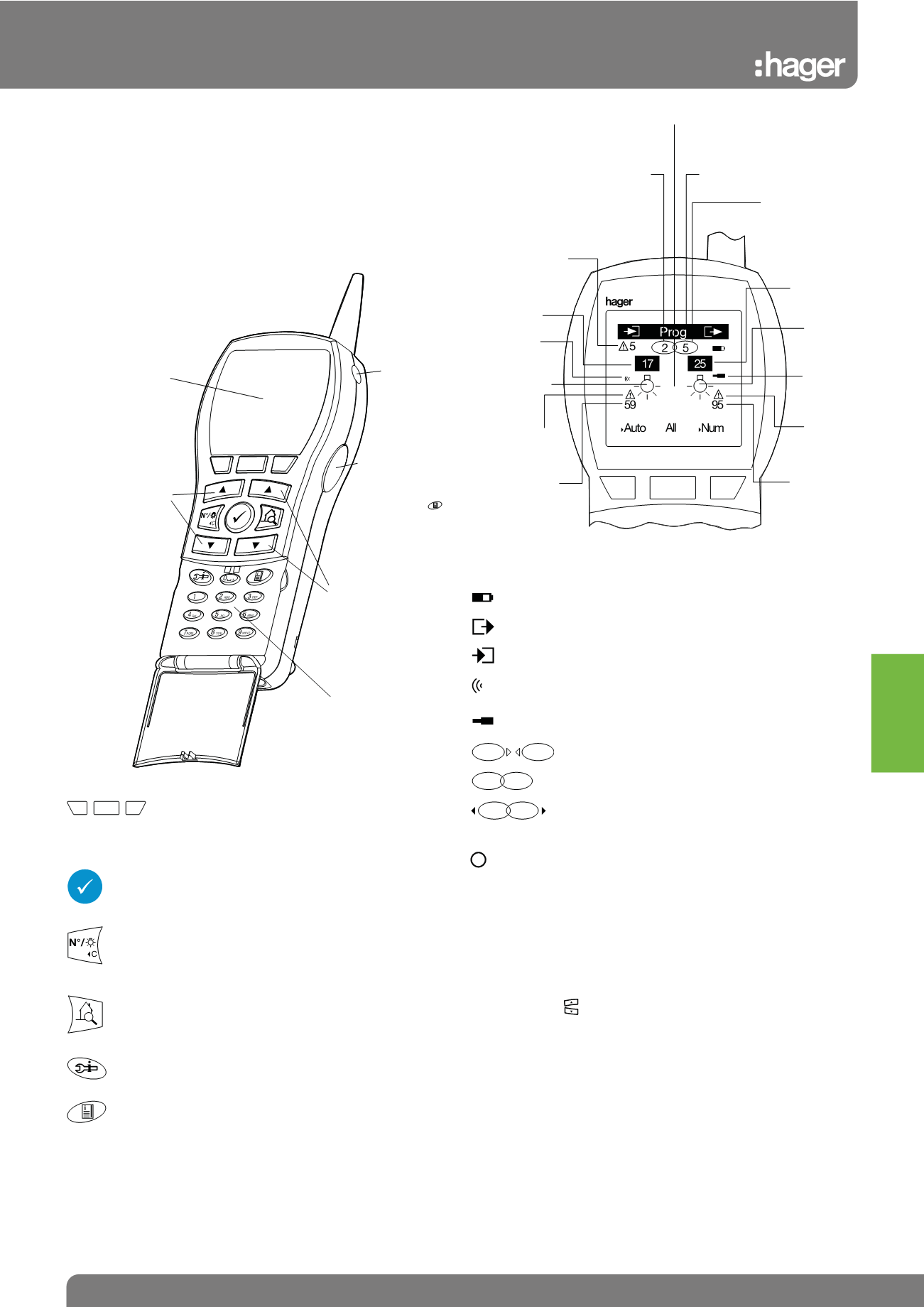
Description of the keys
Back-light screen
Start / Stop
Key
“Access to the
menu” (same
function as )
Output
• Selects an output
number
• Move in the menus
Alphanumerical Keys
Input
• Selects an input
number
• Select a function
allocated to the
selected input
• Move in the
menus
Description of the keys:
Screenkeys
Function of each key is indicated on the screen
above them, the function changes depending on the
screen
• Validates the operation in progress
• Selects the menu
• Validates the entry
• Change the function of the keys on the left
(selection of either an input number or a function)
return to the previous menu
• Activates the selected output
• Starts the numbering of the outputs of the
installation
• Access to the help screens for installation
• Access to menus
Description of the symbols:
Battery charge level
Output
Input
Radio product
Wire product
Preparation of a link
Link established
Delete a link
Sound
• A single “beep” indicates a successful operation
• A double “beep” indicates an unseccessful
operation
Expert Tip
There are 2 ways to select a channel :
• Selection of an input by acting on the appliance that control it :
push-button, switch or remote control. Selection of an output by
acting on the manual control of the output product.
• Selection of the inputs or outputs with TX100GB by their numbers
with the help of keys
Title bar
Output No.
Type of
output
Type of
output TP,
RF
Defect on
displayed
output
Number of
outputs of
the system
Number of outputs
linked to the input
displayed (ex: 5
outputs for the
input 17)
Information relating
to ouputs
Information relating
to inputs
Number of inputs piloting
the selected output (ex.
the output 25 is piloted by
2 inputs whose 17)
Total number of
defects of the
installation
Input number
Type of input
TP, RF
Function of the
input
Defect on the
displayed input
Number of
inputs on
the system
1
1
i
Tebis KNX