



 397 / 582

BETA Switching
Timers
7
LF6, 5TT1 3 timers for buildings
9/19
Siemens ET B1 · 10/2008
9
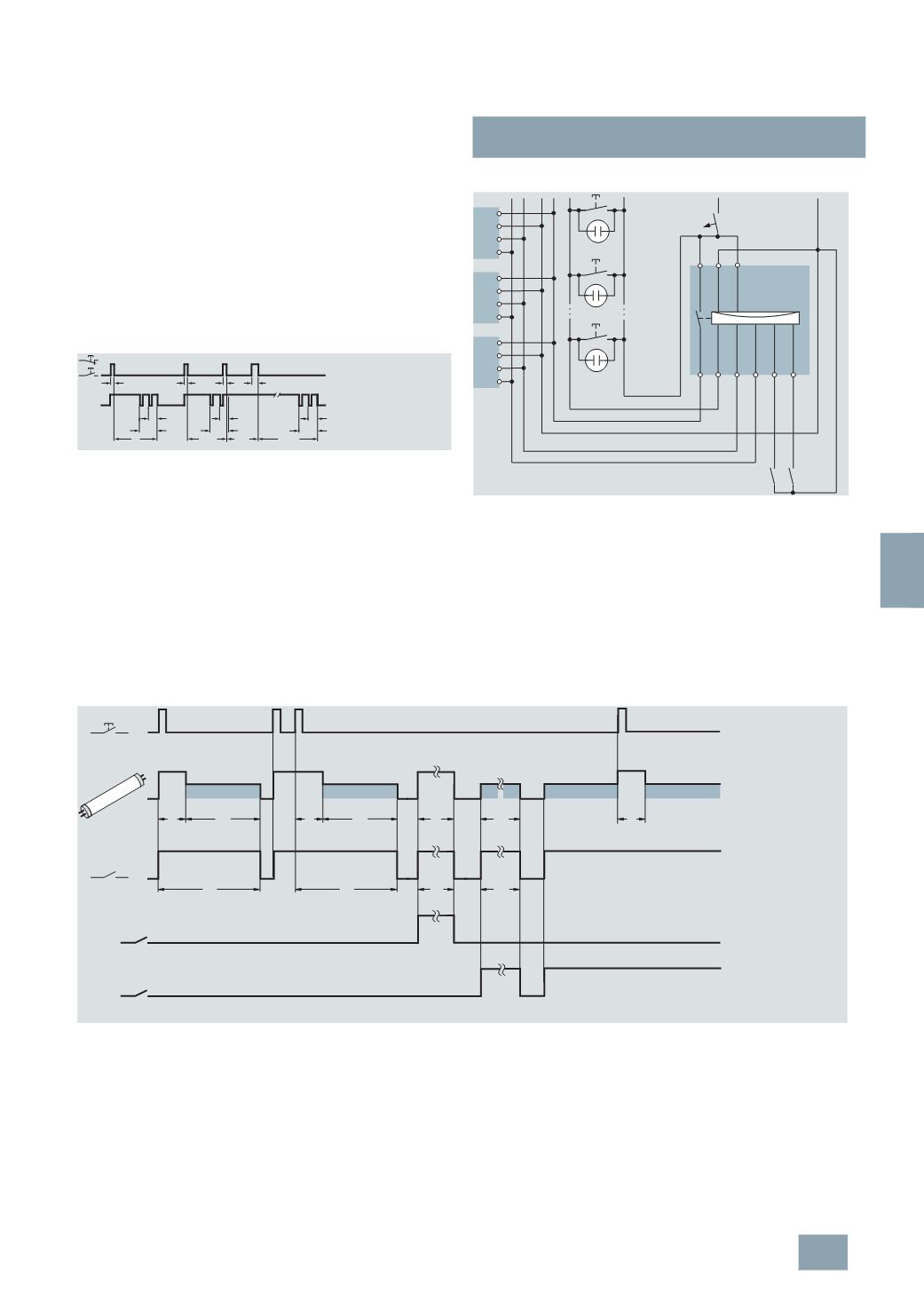
Switching example: 7LF6 114 lighting timer
with advance warning
The timer is connected in the same way as the 7LF6 111 timer in
a 4-wire circuit or 3-wire circuit. When pressed, the lighting timer
switches on for the set runtime, up to 10 minutes. If the switch is
pressed for more than one second, the light is switched on for
four times the set time, i.e. up to 40 minutes. The last press of the
pushbutton is decisive. 20 and 40 seconds before expiry, the
light flashes briefly twice (50 ms) to warn of the impending
switch-off. This allows time to reset the switch while the light is
still on. The timing interval restarts each time the button is
pressed.
t
e
= runtime
Switching example: 5TT1 303 ECG control switch
The device is fitted with a direct voltage input for the control of
an 5LZ. ...-4 ECG Dynamic. When the pushbutton is actuated,
the power supply is released and the ECG dynamic is brightened,
depending on the setting of the timer, for up to 10 minutes.
On expiry of this time, the ECG dynamic is dimmed according to
the set dimmer level, if pressed again it brightens again. If the
switch is not pressed for 30 minutes, the lighting switches off
completely. In addition to these functions, the dimming time and
brightness period can also be controlled using a separate
pushbutton or time switch over control inputs B1 and B2.
Switching the ECG dynamic and the fluorescent lamp as little as
possible extends the service life.
Corridor lighting in homes for the elderly
At mealtimes, from 5 to 7 p.m., the light in the corridors can be
permanently switched on using a time switch (contact B1).
Between 7 and 10 p.m., the lighting is dimmed using switch B2.
Simply press the corridor pushbutton again to return the lighting
to the brighter setting at any time. After 10 p.m., the light is
switched off. It can be switched back on at any time by pressing
the corridor pushbutton.
Corridor lighting in hospitals
During the day – during peak periods, lunch times, visiting times,
shift changes, doctor's rounds – the light is switched on. During
quiet periods, i.e. afternoons and nights, the light is switched to
a dimmed state. A patient can switch the light back to the bright
setting at any time by pressing the corridor pushbutton. In
emergencies, the nurse can switch the light to "emergency
operation", i.e. permanently bright, using switch B1 (no time limit
of brightness period).
!
14
A2 13 A1
T + -
L
N
+
-
L
N
+
-
L
N
+
-
N
B1 B2
B1 B2
I2_07450a
L1 230 V AC
t
1
t
3
t
2
13
t
1
t
3
t
2
14
t
1
t
2
t
3
t
2
B1
B2
t
1
t
1
:
t
2
:
t
3
:
I2_07691a
Bright phase
Operating period
Dim phase
© Siemens AG 2008