



 24 / 52

24
EMEX Test
| How to apply EMEX Test MXC and MXD4
How to apply EMEX Test MXC and MXD4 Emer
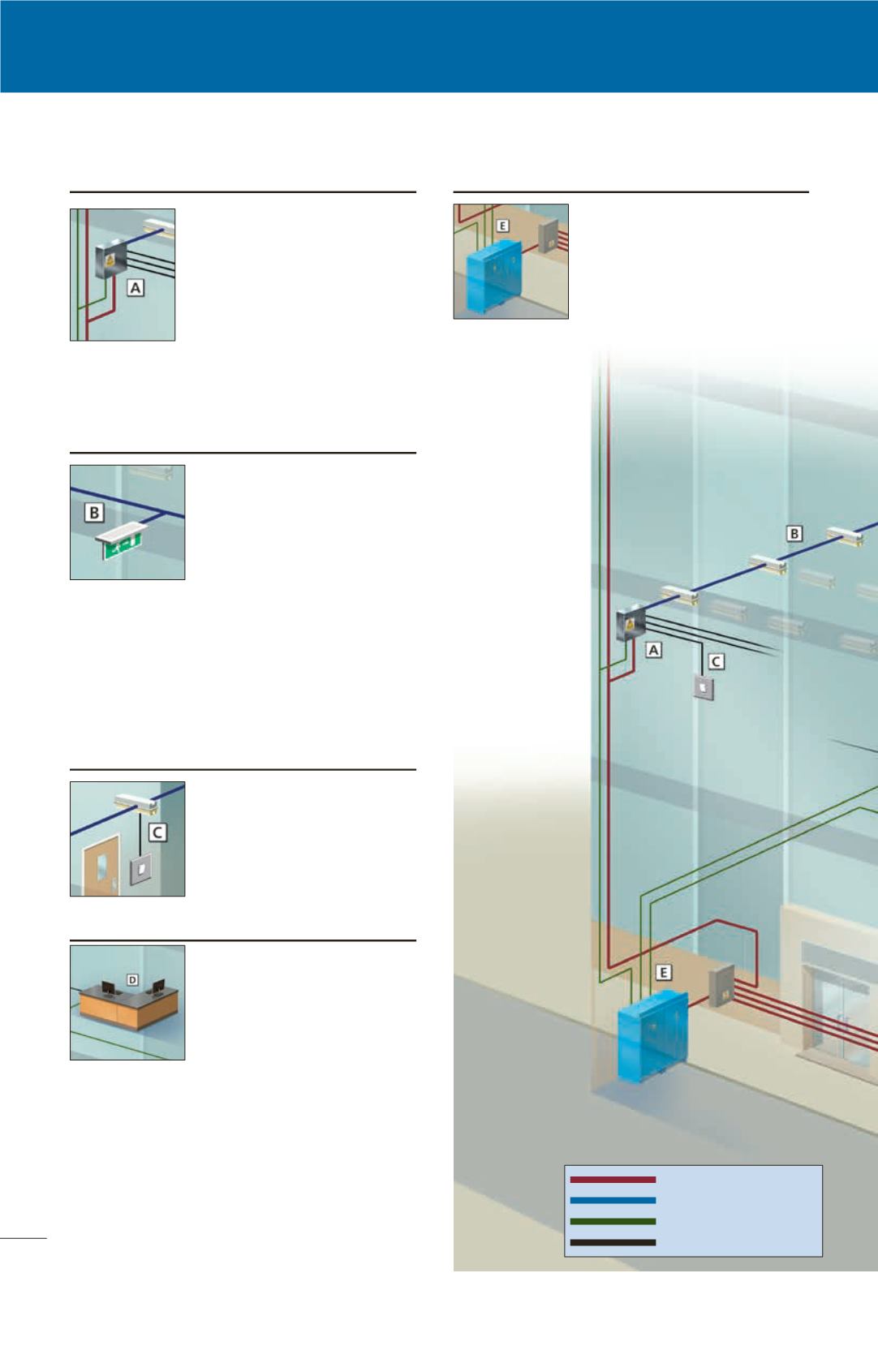
EMEX Power
EMEX Power Central Power
Supply System provides AC
power to emergency luminaires
via standard AC distribution
boards. EMEX Test can support
both MXC and MXD4 systems
simultaneously. Multiple EMEX
Power CPS units can be used
to power larger applcations,
monitored from a single EMEX
Test control point.
AC power
AC power and data
Data cable
Local inputs
MXC substation
Each MXC substation can control
up to 40 luminaires. Power and
datalines feed the substation
which in turn monitors & controls
the luminaires via a single
combined power/data line. Each
substation can monitor up to 8
local switched and/or unswitched
circuits.
Luminaires operate in maintained, switched
maintained, or non-maintained modes on the same
circuit, according to the system programming.
MXC compatible luminaires
The MXC testing system
requires luminaires
(bulkheads, exit signs) to
be MXC compatible.
A comprehensive range of
luminaires can be found
starting on page 23. In
addition, virtually any
standard mains luminaires can be converted for
use with the MXC system using an integral or
remote LTC interface module. Luminaires must
contain a high frequency ballast (please check
with Emergi-Lite). MXCs are not compatible
with switch start control gear, please use MXD4
for these applications.
Switching
One switched and/or one
unswitched local feed can
be wired directly into the
MXC System LTC module, in
addition to the monitoring/
switching provided via the
MXC substation.
EMEX Test control station
EMEX Test software is installed
on a standard desktop PC to
initiate scheduled tests and
collate test report data. System
status can be accessed
remotely over a Local Area
Network (LAN), or via the
internet utilizing the EMEX TS option. EMEX Test
can optionally export system status in BACNET or
LONWORKS format to a Building Management
System. (Note: The output format will be
dependent on the Building Management
integrators system functionality and capabilities,
see EMEX LONWorks profile document for further
information)
A network node enables the engineer to access
test reports and control the system using a laptop
PC from any point on the data cable.