


 401 / 430

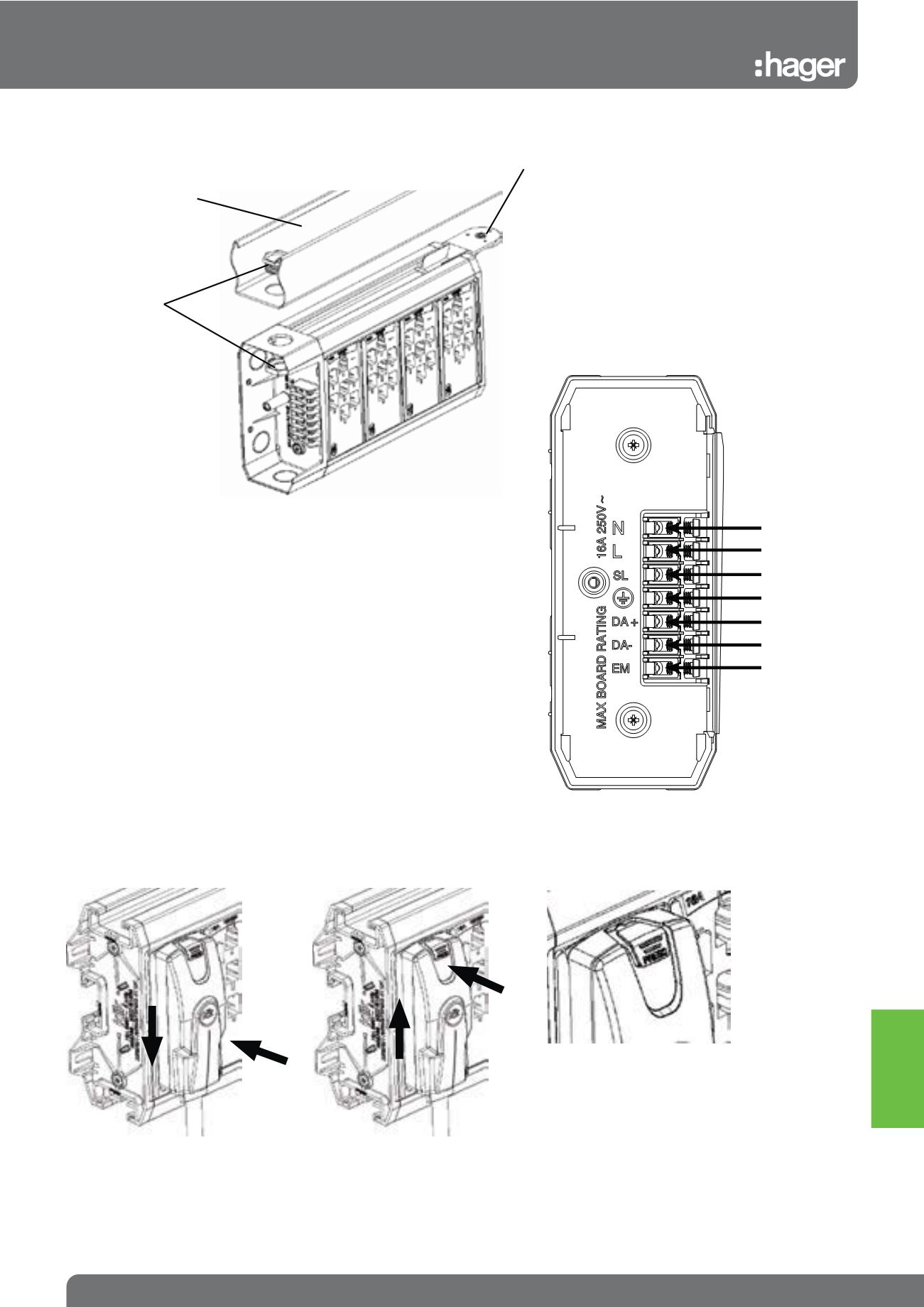
Mounting Options for Trunking
Mounting Accessory can be clipped into the rear or top channel slot.
It can be easily removed by inserting a screwdriver in the RELEASE
slot.
Fixed Wiring Connection
Klik 7 Pin LMB has 7 screw terminals available to the installer and are
arranged in the end cap as per diagram. DA+/DA- connections can
be used for DALI/DSI control.
Making a Connection
To connect, locate plug in socket
and push down to connect and
lock
To disconnect, press button to
unlock and push up to remove.
Plug type is identifiable by the
colour of the button
Trunking
20mm Conduit
Bush & Lock nut
Use a machine screw and nut
to secure to trunking using
Mounting Accessory
2.
2.
1.
1.
Example of
a page title
9.31
Sales Service Centre • 01952 675612 Technical Support Helpline • 01952 675689
Klik 7 Pin
Mounting Methods & Connecting Plugs
Neutral
Line
Switched Line
CPC
Data +
Data -
Emergency Line
White:
Luminaire Lead
Red:
Luminaire + Emergency
Black:
Link Lead
Blue:
Switching (OS, Wall)
Lighting
Connection
& Control