




 23 / 413

1/17
Presentation
(
continued)
Migration of Premium processors
(
continued)
Migration offers involving the replacement of the processor are available for other
product references. Please contact your Customer Care Centre for more information
about these offers, which are only available for a limited period of time. They concern
the following PL7 processors:
b
TSX P57 2823M
for migration to
TSX P57 254M
with
TSX ETY 4103
(1)
.
b
TSX P57 453AM
for migration to
TSX P57 454M
b
TSX P57 453AM
for migration to
TSX P57 554M
b
TSX P57 4823AM
for migration to
TSX P57 4634M
b
TSX P57 4823AM
for migration to
TSX P57 5634M
b
TSX P57 4823AM
for migration to
TSX P57 454M
with
TSX ETY 4103
(1)
.
b
TSX P57 4823AM
for migration to
TSX P57 554M
with
TSX ETY 4103
(1)
.
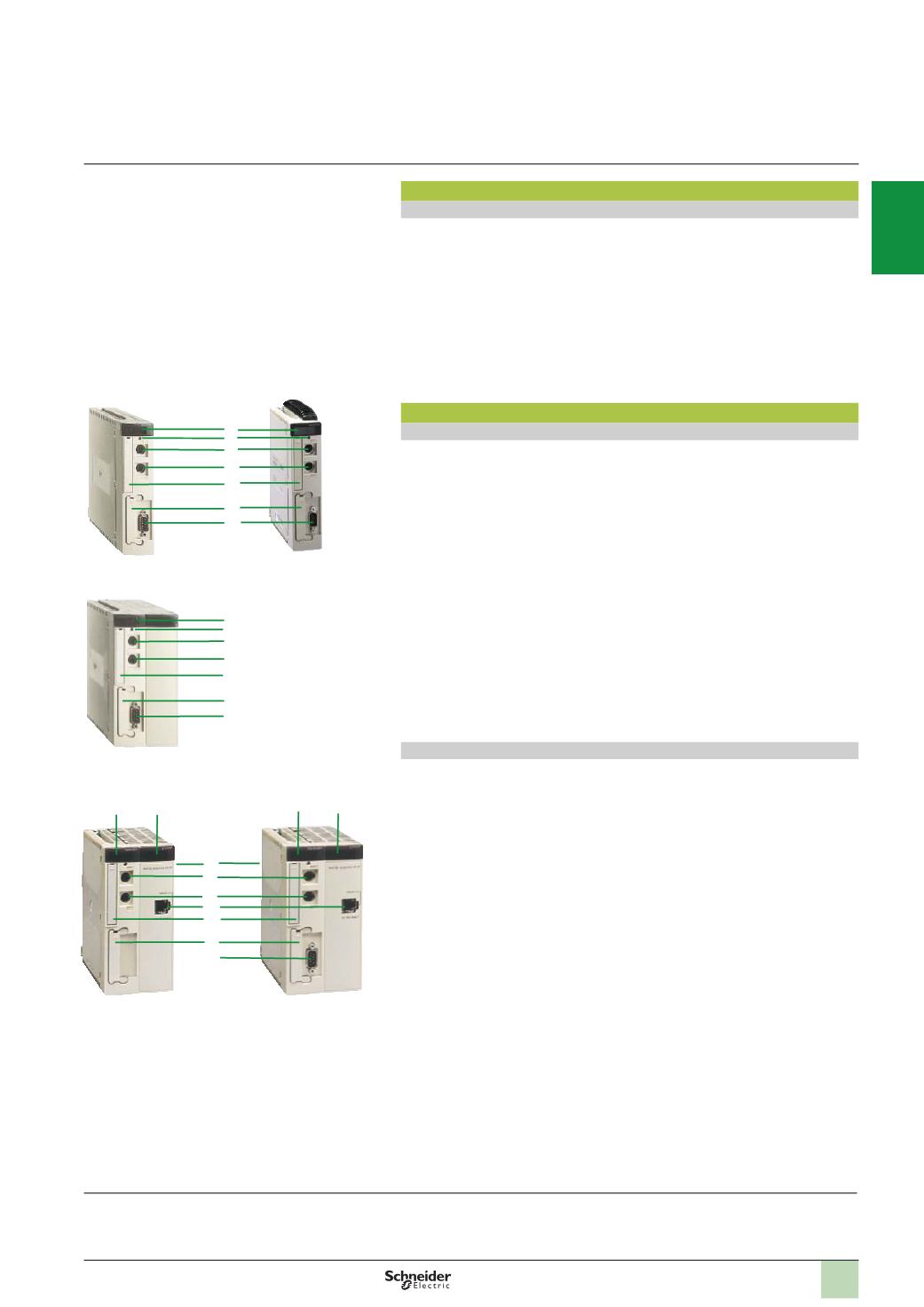
Description
Processors without integrated Ethernet port
Single-format
TSX P57 1
p
3
M
/
353
LAM
processors and double-format
TSX P57 2
p
3
M/3
p
3
AM/453AM
processors feature the following on the front panel:
1
A display block with 5 LEDs:
v
RUN LED (green): processor in operation (program running)
v
ERR LED (red): Fault on the processor or its on-board devices (PCMCIAmemory
card and PCMCIA communication card)
v
I/O LED (red): Faults occurring on another station module or configuration fault
v
TER LED (yellow): Activity on the terminal port
v
FIP LED (red): Activity on the integrated Fipio bus
2
ARESETbutton causing a cold start of the PLCwhen pressed.
3
An 8-way female mini-DIN connector marked TER for connecting a programming
or adjustment terminal.
4
An 8-way female mini-DIN connector marked AUX for connecting a peripheral
device
5
A PCMCIA slot (no. 0) for a memory extension card
6
A PCMCIA slot (no. 1) for a communication card or 4 Mb SRAM memory
extension card for storing additional data
7
A 9-way SUB-D connector (on
TSX P57 153M/253M
,
TSX P57 353 LAM
and
TSX P57 353M/453AM
models) for Fipio bus manager communication
Processors with integrated Ethernet port
Double-format
TSX P57 2623M/2823M
and
TSX P57 3623AM/4823AM
processors
with integrated Ethernet port feature the following on the front panel:
1
A display block with 5 LEDs:
v
RUN LED (green): processor in operation (program running)
v
ERR LED (red): Fault on the processor or its on-board devices (PCMCIAmemory
card and PCMCIA communication card)
v
I/O LED (red): Faults occurring on another station module or configuration fault
v
TER LED (yellow): Activity on the terminal port
v
FIP LED (red): Activity on the integrated Fipio bus
2
A display block relating to the integrated Ethernet port featuring 5 LEDs:
v
RUN LED (green): Ethernet port ready
v
ERR LED (red): Ethernet port fault
v
COL LED (red): Collision detection
v
STS LED (yellow): Ethernet link diagnostics
v
Two TX and RX LEDs (yellow): Transmission/reception activity
3
ARESETbutton causing a cold start of the PLCwhen pressed.
4
An 8-way female mini-DIN connector marked TER for connecting a programming
or adjustment terminal.
5
An 8-way female mini-DIN connector marked AUX for connecting a peripheral
device
6
An RJ45 connector for connection to the Ethernet network
7
A PCMCIA slot (no. 0) for a memory extension card
8
A PCMCIA slot (no. 1) for a communication card or 4 Mb SRAM memory
extension card for storing additional data
9
A 9-way SUB-D connector (on
TSX P57 2823M/4823AM
models) for Fipio bus
manager communication
TSX P57 1
p
3
M
TSX P57 2
p
3
M/3
p
3
AM/453AM
1
2
3
4
5
6
7
1
2
3
4
5
6
7
Presentation
(
continued)
,
description
Modicon Premium automation
platform
PL7 processors
(1)
The
TSX ETY 4103
Ethernet Modbus/TCPmodule offered features the same functions as the integrated Ethernet port on
TSX P57 2823M/ 4823AM
processors.
However, the combined processor and Ethernet module use one slot more than the PL7 processor to be migrated. Therefore, this type of migration requires a
free slot in the Premium rack and modification of the converted Unity Pro application.
TSX P57 353LAM
TSX P57 2623M
TSX P57 3623AM
1
2
1
3
2
6
8
5
4
9
7
TSX P57 2823M
TSX P57 4823AM
2
1
3
4
5
6
7
8
9
10