




 168 / 413

5/34
Functions
(
continued)
Global Data service diagnostics
Modicon Premium automation
platform
0
Ethernet Modbus/TCP network
Ethernet Modbus/TCP communication services
Functions
(
continued)
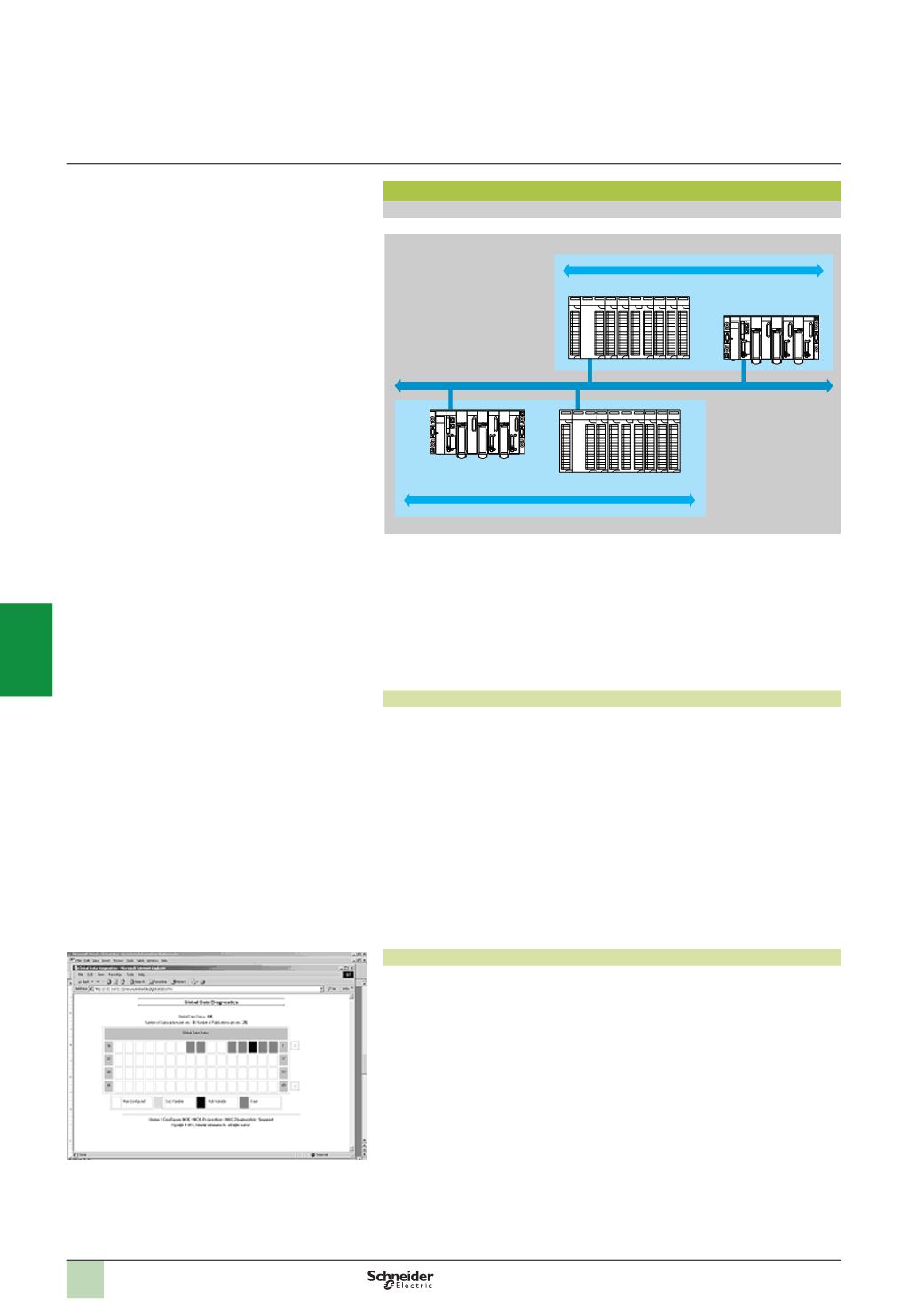
Global Data service
The Global Data service performs data exchanges in real time between stations
belonging to the same distribution group. It is used to synchronize remote
applications, or to share a common database between a number of distributed
applications.
Exchanges are based on a standard producer/consumer protocol, guaranteeing
optimum performance with a minimum load on the network. This RTPS (
Real Time
Publisher
Subscriber) protocol is promoted by Modbus-IDA (
Interface for Distributed
Automation
),
and has already been adopted as a standard by several
manufacturers.
Characteristics
Amaximum of 64 stations can participate in Global Data within the same distribution
group.
Each station can:
b
Publish one 1024-byte variable. The publication period can be configured from
1
to n processor master task
(
Mast)
periods
b
Subscribe to between 1 and 64 variables. The validity of each variable is
controlled by status bits
(
Health Status bits)
linked to a refresh timeout configurable
between 50 ms and 1s. It is not possible to access a variable element. The total size
of subscribed variables amounts to 4 K contiguous bytes.
To further optimize the performance of the Ethernet network, Global Data can be
configured with the multicast filtering option which, combined with switches in the
ConneXium range (see pages 5/50 ...), distributes data only to Ethernet ports where
there is a station subscribed to the Global Data service. If these switches are not
used, Global Data is sent in multicast mode to all switch ports.
Global Data service diagnostics
The diagnostic screens use a colour code to show the Global Data status:
b
Configured/not configured/faulty
b
Published/subscribed
Global Data service diagnostics can be performed in one of five ways:
b
Via the application program from a specific PLC data zone
b
From the setup software debug screen
b
From the PLC system diagnostic function displayed by means of a web browser
on a PC station
b
Using the TSX EAZ 01P SFE10 ConneXview diagnostic software
b
Using standard SNMP network management software
Distribution group 1
Data exchange 4 KB max.
Data exchange 4 KB max.
Distribution group 2
IP multicast 239.255.255.251
IP multicast 239.255.255.250
Ethernet
Modbus/TCP
2
1
3
4
5
6
7
8
9
10